One Time Registration (OTR) creates your Kerala PSC profile. The Commission's OTR instructions say that to apply for a notified post you must register and create a profile, and that new users open Thulasi and press Sign Up.
Start registration on Thulasi thulasi.psc.kerala.gov.in/thulasi
Before you start
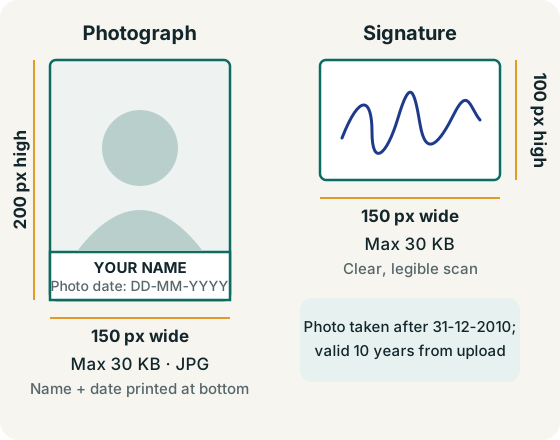
- A digital photograph and a scanned signature in the required sizes (table below).
- Your name and date of birth exactly as in your SSLC or equivalent certificate.
- Your own mobile number — the Commission's SMS service reaches only candidates who give one — and an email address.
- Identity details: Aadhaar if you have it, which the Commission asks candidates to add as ID proof (Tips to Applicants).
- Address details including district, taluk, village and local body.
Photo and signature specifications
| Item | Requirement |
|---|---|
| Photograph size | 150 × 200 pixels (width × height), not more than 30 KB |
| Photograph format | JPG |
| Photograph text | Your name and the date the photo was taken, in two lines of black text on a white rectangular background at the bottom of the photo — applications with photos missing these can be rejected |
| Photograph date | Taken after 31 December 2010; valid for 10 years from the date of upload |
| Signature size | 150 × 100 pixels, not more than 30 KB, clear and legible |
Sources: OTR new registration instructions (PDF), instructions for registered candidates (PDF), Tips to Applicants. and the requirements shown on the Thulasi home page.
How to register (One Time Registration steps)
- Open thulasi.psc.kerala.gov.in/thulasi/ or select One Time Registration Login on keralapsc.gov.in.
- Next to New Registration, select Sign Up (below the Registered User Login box).
- Upload your photograph, read the instructions, tick the agreement and continue.
- Upload your signature.
- Enter personal details — name and date of birth as in your certificate, gender, religion, caste, parents' names and identification marks — and check them before moving on.
- Enter permanent and present address details, then your email and mobile number.
- Choose a User ID and password. Note them down privately; you will need them for every application.
- Read the declaration, tick it and submit. Print the registration details for your records.
The Commission's instructions say a candidate must not register more than once. If you already have a profile but cannot log in, use password and User ID recovery instead of creating a new one.
After registration
Log in and complete your profile — especially qualifications — before applying. See how to apply from My Profile. The Commission's mode of submitting applications (PDF) and how to apply (PDF, Malayalam) give the official process.
Common registration problems
- Photo rejected: resize to exactly 150 × 200 px JPG under 30 KB (the portal’s Resize Photograph/Signature link can help); make sure the two-line name and date strip is visible.
- Signature too large: crop tightly, scan in good light, save at 150 × 100 px and under 30 KB.
- OTP not received: confirm the mobile number is correct and active, then retry after a short wait.
- User ID unavailable: choose a different combination of letters and numbers.
OTR FAQ
Who has to do One Time Registration?
Anyone who wants to apply for a post notified by the Kerala PSC must register and create a profile first (OTR instructions).
Is One Time Registration the same as applying for a job?
No. Registration creates your profile. Applying is a separate step you do for each post from your profile.
Is there a fee for registration?
The Commission's Tips to Applicants say no application fee is required.
Do I need a new photo for each application?
No. An accepted photo is valid for 10 years from upload (Tips to Applicants).