Kerala PSC admission tickets (hall tickets) are downloaded from your profile on the Thulasi portal — not from a separate website. For most examinations you must first confirm that you will write the exam.
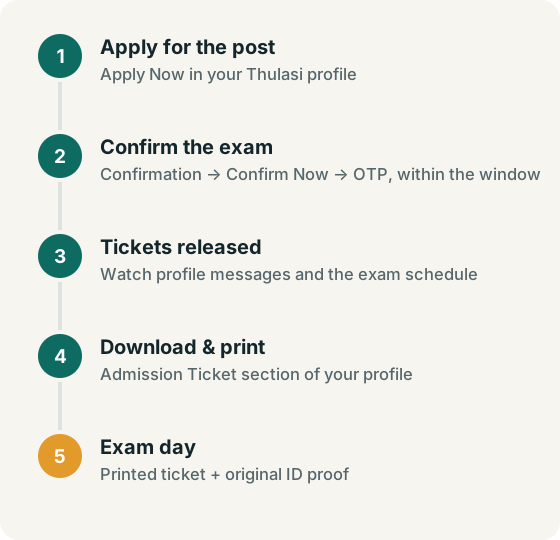
Step 1: Submit exam confirmation
The Commission publishes its confirmation procedure as a PDF in Malayalam. In outline:
- Log in to Thulasi during the confirmation period announced for your exam.
- Open the Confirmation section from your profile dashboard.
- Select the exam and choose Confirm Now.
- Complete the OTP verification sent to your registered mobile number.
- Submit the confirmation and check that the status shows as confirmed.
Confirmation dates are announced per exam. Candidates who do not confirm in time may not receive an admission ticket. Check the exam schedule and your profile messages.
Step 2: Download the admission ticket
- When the Commission releases admission tickets for your exam, log in to Thulasi.
- Open the Admission Ticket section of your profile.
- Select the exam and download the ticket.
- Check your name, photo, exam date, time and centre. Print it clearly.
On exam day
- Carry the printed admission ticket and an original identity document as required in the instructions printed on the ticket.
- The Commission accepts the UDID card as identification for candidates with disabilities (circular).
- Mobile phones and other electronic gadgets are prohibited in exam halls (Tips to Applicants).
- Read the official instructions to candidates, including the general instructions (PDF).
Hall ticket problems
| Problem | What to do |
|---|---|
| Admission ticket not showing | Check that you confirmed in time and that tickets for your exam have been released. |
| Wrong details on ticket | Contact the Commission straight away: 0471-2546346 or 0471-2546345 (applications/confirmation), per its contact page. |
| Can't log in to download | See password and User ID recovery. |
| PDF won't open | Download again, or use another browser or device. |
Hall ticket FAQ
Where do I download my Kerala PSC hall ticket?
Only inside your Thulasi profile at thulasi.psc.kerala.gov.in. Be wary of sites offering hall-ticket downloads without logging in to the official portal.
Is confirmation needed for every exam?
Confirmation is required for the exams the Commission specifies. Check the notification, exam schedule and your profile messages for each exam.
Can I change my exam centre?
Requests are handled by the Commission. Contact it through the official contact page.