"My Profile" is the personal account you reach after logging in to the Thulasi portal. It holds the details you gave during One Time Registration and is where every Kerala PSC application, confirmation and admission ticket lives.
How to open your Kerala PSC My Profile
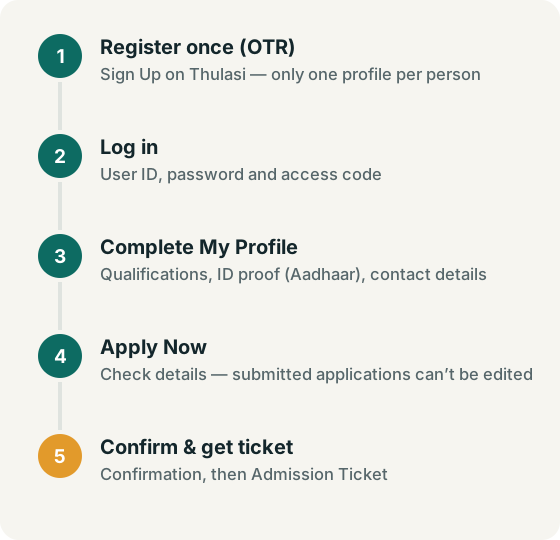
- Go to thulasi.psc.kerala.gov.in/thulasi/.
- Enter your User ID, password and any access code shown, then log in.
- Your profile home page opens. Use the menu on that page to move between sections.
Can't get in? See forgot password and login problems.
What you can do in My Profile
Menu names can change, so treat this as a guide to tasks rather than exact labels:
| Task | What it means |
|---|---|
| View / print registration card | The Commission says the Registration Card link shows your registered details and can be printed (Tips to Applicants). |
| Add qualifications | Record each qualification you hold, from SSLC upward, before applying. Posts check eligibility against these details. |
| Add ID proof / Aadhaar | "Candidates who have AADHAAR card should add AADHAAR card as I.D. Proof in their profile" (Tips to Applicants). |
| Notifications & Apply Now | Browse current notifications and apply for a post. |
| My applications | See the posts you have applied for and print copies. |
| Confirmation | Confirm that you will write an exam. How confirmation works |
| Admission ticket | Download the hall ticket for confirmed exams. |
| Profile messages | Read messages the Commission sends to your profile. |
Applying for a post from your profile
- Read the notification on keralapsc.gov.in/notifications — eligibility, age limits, qualifications and last date.
- Make sure your profile shows every qualification the post needs. Qualifications must be acquired on or before the last date (Doubts and facts).
- Log in, open the notifications list in your profile and select Apply Now against the post (Tips to Applicants).
- Check every detail before final submission. The Commission states that a submitted application is provisional and cannot be deleted or altered.
- Print or save a copy of the application for your records.
According to the Commission's Doubts and facts page, no documents need to be attached with the application. Certificates proving qualification, experience, community and age are produced when the Commission calls for them.
Profile photo validity
The photograph must have your name and the date it was taken printed at the bottom. Once uploaded and accepted, it is valid for 10 years from the date of upload (Tips to Applicants). If your photo is close to that limit, replace it before applying. Size rules are in the OTR guide.
Logging out safely
Always use the portal's logout option before closing the page, especially on a shared phone, cyber café or office computer. Do not let the browser save your Thulasi password on a device other people use.
My Profile FAQ
Can I edit my name or date of birth in My Profile?
Core details are not freely editable after registration. Contact the Commission through the numbers on its contact page for correction procedures.
Why does my profile show an Aadhaar or ID proof prompt?
The Commission asks candidates with Aadhaar to add it as ID proof in the profile (Tips to Applicants). Follow the on-screen steps in the portal.
Where do I see my exam results?
Results, short lists and ranked lists are published on Short Lists and Ranked Lists; individual marks are on the Exam Marks page. Messages may also appear in your profile.
Is "PSC login my profile download" a separate service?
No. Downloads such as the registration card, application copies and admission tickets are all inside your Thulasi profile after login.