Most login problems on the Kerala PSC Thulasi portal fall into four groups: a forgotten password, a forgotten User ID, a rejected access code or OTP, and the site being slow. Here is what to do for each.
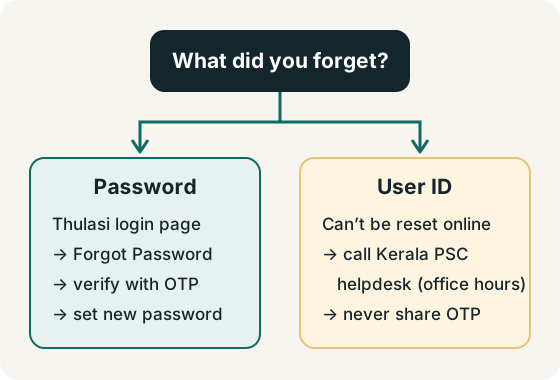
Forgot your Thulasi password
- Open the Thulasi login page.
- Select Forgot Password? just below the Log In button.
- Enter the details the page asks for — typically your User ID and date of birth — and complete the verification, which uses an OTP sent to your registered mobile number or email.
- Set a new password and log in with it. Store it privately.
The exact fields shown can change; follow the screen. For comparison, the Commission's departmental-test portal documents its own reset as User ID + date of birth + the unique ID type and number you registered with (Departmental FAQ).
Forgot your User ID
A User ID is not something you can choose again. The Commission's guidance (published for its departmental portal) is to telephone the helpdesk and give the details they ask for so they can trace the User ID (Departmental FAQ). For the candidate portal, use the Kerala PSC enquiry numbers:
| Purpose | Official numbers |
|---|---|
| General enquiry | 0471-2546400, 0471-2546401, 0471-2447201, 0471-2444428 and 0471-2444438 |
| Applications, confirmation, document upload | 0471-2546346, 0471-2546345 |
| kpsc.psc@kerala.gov.in |
Source: Kerala PSC contact page, checked 25 October 2026. The same five general numbers are listed as the Help Desk (working hours only) on the Thulasi login page. Never give your password or OTP over the phone.
Registering again to get round a lost User ID is against the Commission's instructions — a candidate must not register more than once.
Access code or captcha not accepted
- Type the characters exactly as shown; access codes may be case-sensitive.
- Use the refresh icon beside the code for a new one, or the speaker icon to hear it.
- Make sure the User ID and password fields have no extra spaces (especially after pasting).
OTP not received
- Check that the mobile number registered in your profile is still active and has signal.
- Wait a minute or two before requesting another OTP; repeated requests can delay delivery.
- If the registered number is no longer yours, contact the helpdesk above.
Logout and session problems
- If the portal logs you out unexpectedly, your session may have timed out — log in again.
- Do not open your profile in several tabs at once while applying.
- Always log out when finished; on shared devices, close the browser afterwards.
Site not loading or very slow
- Traffic peaks around application last dates and admission-ticket releases. Try early morning or late evening.
- Clear the browser cache, or try another up-to-date browser.
- Check you are on the real address, thulasi.psc.kerala.gov.in — not a lookalike site. See how to spot fakes.
Login problems FAQ
Can psclogin.com reset my password?
No. Only the official Thulasi portal or the Kerala PSC helpdesk can help with your account. We never ask for your login details.
My password is correct but login fails. Why?
Check for caps lock, the access code, extra spaces and the correct User ID. If it still fails, use Forgot Password.
I changed my mobile number. How do I receive OTPs?
If you can still log in, update contact details in your profile where allowed. If not, contact the Commission using the numbers on its contact page.