Which Kerala PSC website do you need?
Search results mix three different official addresses. Use the one that matches your task:
Thulasi (candidate login)
thulasi.psc.kerala.gov.in/thulasi/
One Time Registration, login, My Profile, Apply Now, confirmation, admission tickets and profile messages.
keralapsc.gov.in (information)
www.keralapsc.gov.in
The Commission's main website: notifications, exam schedules, ranked lists, instructions. Its One Time Registration Login link leads to Thulasi.
Departmental tests (employees)
psc.kerala.gov.in/kpsc/
A separate login used only by government employees for departmental examinations.
How to log in to Kerala PSC Thulasi
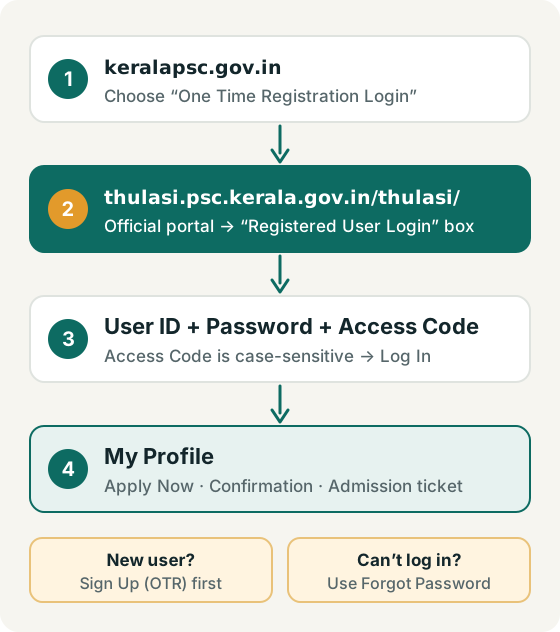
- Open thulasi.psc.kerala.gov.in/thulasi/ — or go to keralapsc.gov.in and choose One Time Registration Login, which points to the same portal.
- Check the address bar shows psc.kerala.gov.in before you type anything. See how to recognise the real portal.
- In the Registered User Login box, enter your User ID and Password, then type the Access Code shown in the image. The access code is case-sensitive; use the refresh icon for a new one or the speaker icon to hear it.
- Select Log In. Your profile home opens, from where you reach My Profile, notifications, applications, confirmation and admission tickets.
- When you finish — especially on a shared or public computer — use the portal's logout option and close the browser.
The Commission asks candidates to keep their password secret and to quote their User ID in any communication with it (Tips to Applicants). Write the User ID somewhere safe; a forgotten User ID cannot simply be reset online.
First time? Register before you can log in
Logging in only works after One Time Registration (OTR). The Commission's OTR instructions tell new candidates to open Thulasi and press Sign Up. You fill in personal details, address and contact details, upload a photograph and signature, choose a User ID and password, and submit. Each candidate may register only once.
Step-by-step OTR guide with photo & signature sizes
What do you want to do after login?
Quick troubleshooting
| Problem | What to try |
|---|---|
| Forgot password | Use the Forgot Password option on the Thulasi login page and follow the on-screen verification. Password reset steps |
| Forgot User ID | Contact the Kerala PSC helpdesk during working hours. Helpdesk numbers |
| Access code rejected | It is case-sensitive — match capitals exactly, or use the refresh icon for a new code. |
| OTP not arriving | Check the mobile number in your profile is current and has signal; wait before requesting again. |
| Page won't load | Retry outside peak hours (closing dates are busy), clear cache, or try another browser. |
| Apply Now not working | Check eligibility, the last date, and that your profile details are complete. Apply Now checklist |
Stay safe when logging in
- Only enter your password on thulasi.psc.kerala.gov.in. Official Kerala PSC addresses end in .gov.in.
- Never share your password or OTP with anyone — including coaching centres, agents or websites like this one.
- Ignore sites ending in .com, .in or similar that show a "Thulasi login" form.
PSC login FAQ
What is the official PSC login website for Kerala?
Candidate login is on the Thulasi portal, thulasi.psc.kerala.gov.in/thulasi/. The Commission's own One Time Registration Login page links to this address.
Is Thulasi the same as My Profile?
Thulasi is the portal; My Profile is your personal account inside it. "PSC login my profile" simply means logging in to Thulasi to see your own profile. Read the My Profile guide.
Can I log in to my Kerala PSC profile on psclogin.com?
No. This is an independent information site. We link to the official portal and never collect login details.
Do I need to register again for every exam?
No. One Time Registration is done once; you then apply for each post from your profile using Apply Now (Tips to Applicants).
Is there a fee to register or apply?
The Commission's Tips to Applicants state that no application fee is required for applications made through the profile. Departmental tests are different and use online fee payment.
How do I log out of Thulasi?
Use the logout option inside the portal, then close the browser tab. On shared computers, also clear the browser history.
Official sources used on this page
- Kerala PSC — One Time Registration Login
- Kerala PSC — OTR Instructions to Candidates
- Kerala PSC — Tips to Applicants
- Kerala PSC — Contact us
Portal screens and procedures can change. If anything here differs from the official website, follow the official website. Malayalam: കേരള പി.എസ്.സി തുളസി ലോഗിൻ — തുളസി പോർട്ടൽ വഴിയാണ് ഉദ്യോഗാർത്ഥികൾ പ്രൊഫൈലിൽ പ്രവേശിക്കുന്നത്.